- Choose the email that matches the situation, whether it’s a first approach, an introduction, or an unanswered message.
- Try 60–90 words for a first cold email, with a clear subject and one question the prospect can answer.
- Connect a verified business detail to your offer. Ask about the buyer’s plans without assuming they have a problem.
- Give each follow-up something new to say. Pause scheduled messages when a reply arrives and respect requests to stop.
- Judge replies by the conversations and meetings they lead to. Compare rates calculated the same way and treat recorded opens cautiously.
Your prospect has gone quiet. A colleague has offered an introduction. Another buyer wants to know how your service compares with the team they already have. Each situation calls for a different email. But having to draft a new one for every single lead and situation loses time and focus. Thankfully, templates exist.
These seven templates give you a starting point for those conversations, from the first approach to the final follow-up. The companies and contacts in each are fictional. Insert your own research to make the details fit.
How to Choose the Right B2B Sales Email Template
To save time, find your situation in the table below and go straight to the matching example.
| Your situation | Check first | Choose |
| First contact with a suitable account | The company and role fit your offer | First cold email |
| A relevant business change | The event, date, and scope are current | Business-change email |
| An introduction or permission to name a contact | Exactly what the referrer said and did | Referral email |
| You’re unsure who owns the work | The recipient works near the relevant team | Routing email |
| The buyer is comparing providers | A current source confirms the evaluation | Comparison email |
| No reply, with something new to offer | No decline or opt-out, and a useful addition | Follow-up email |
| No reply, with nothing useful left to add | Pause outreach | Final follow-up |
7 B2B Sales Email Templates You Can Adapt Now
A first email needs enough detail to make the offer clear. According to Gong, messages with 100 words or fewer had higher reply rates, and three to four sentences performed best. For your first draft, try 60–90 words. At 100–120, look for explanations you could save for the reply. Start testing subjects around three to seven words, or 20–50 characters.
Then consider what you’re asking the buyer to do. Gong found that interest-based questions worked best in cold outreach when success meant a meeting booked within 10 days. Specific scheduling requests worked better during active deals. For a new contact, ask if your offer would be useful to their team. When a buyer is already talking through the offer with you, suggest a day and time for the next meeting.
Then add your signature, required business information, and a working opt-out. Body text word count includes the greeting and sign-off, with each bracketed placeholder counted as one word.
Template 1: A Cold Email to Start the Conversation
Use this template when the account looks promising and you don’t have an introduction or a recent event to lead with. Offer one concrete way to explore the fit.
| New message |
|---|
| From: [Sender email] To: [Recipient email] Subject: A prospecting idea for Harborline Hi [First Name], I’m writing with an idea for one of Harborline’s sales regions. At SalesRoads, we research accounts, verify contacts, and run phone-led outreach for software teams. We could test one region so you can judge the quality of the sales conversations before expanding. Would a small prospecting test be worth exploring? Best, [Name] |
Body: 54 words | Subject: 5 words, 33 characters
Before you send: Check how the account organizes its markets and who handles sales development. Make sure your team can deliver the regional test you’re offering.
After an interested reply: Ask which region they’d consider and what they’d want the test to establish.
Template 2: A Business Change Gives You an Opening
Use a current business change to ask a relevant question. Here, hiring across 12 territories leads to a question about prospecting coverage.
| New message |
|---|
| From: [Sender email] To: [Recipient email] Subject: Prospecting across 12 territories Hi [First Name], I saw on Northfield’s careers page that you’re hiring across 12 sales territories. How are you planning prospecting coverage across those territories? SalesRoads can test one territory first, handling account selection, buyer verification, and managed SDR outreach. This way, you’d see how it works in one territory before deciding whether to expand. If this is too early or belongs elsewhere, I can adjust. Best, [Name] |
Body: 67 words | Subject: 4 words, 33 characters
Before you send: Check that the careers page still lists those roles and territories. A territory might mean a geographical area or an assigned group of accounts, so confirm how the target company defines them.
After a reply: Use their answer to update the timing or find the right person. If they’re interested in outside support, ask which territory they’d consider for a test.
Template 3: A Referral Email With the Right Opening
Has your contact put both you and the prospect in an email, or simply said you could mention their name? In the first case, reply in the thread. In the second, write a new message.
3A. A direct email introduction
Jordan has introduced Maya at SalesRoads to Morgan at Cedarstone. Maya replies under the same subject, with Jordan’s message still in view.
| Outbound coverage at Cedarstone |
|---|
| From: Jordan To: Morgan, Maya Hi Morgan, I’d like to introduce you to Maya at SalesRoads. Maya, Morgan leads revenue operations at Cedarstone. You both mentioned outbound coverage, so I thought it made sense to connect you. Best, Jordan |
| Reply all Maya To: Morgan, Jordan Thanks for the introduction, Jordan. Morgan, good to meet you.SalesRoads helps growth teams build qualified conversations through account research and phone-led SDR outreach across target accounts. Is that worth exploring for Cedarstone, or does the topic sit elsewhere? Best, Maya |
Reply body: 41 words | Subject: retain the existing thread’s subject
Before you send: Stay with the topic the contact introduced. The lead should be able to read the exchange without opening a separate email.
3B. Permission to mention a name
Here, Jordan has suggested Morgan as the person to contact and agreed for you to mention the connection. There’s no introduction thread to answer.
| New message |
|---|
| From: [Sender email] To: [Recipient email] Subject: Jordan suggested I contact you Hi Morgan, Jordan suggested I get in touch with you about outbound coverage at Cedarstone. SalesRoads helps growth teams build qualified conversations through account research and phone-led SDR outreach across target accounts. Is that worth exploring for Cedarstone, or does the topic sit elsewhere? Best, [Name] |
Body: 46 words | Subject: 5 words, 30 characters
Before you send: Confirm both parts with your referrer, the suggested contact, and permission to mention the connection. A familiar name gives you an opening while the prospect still decides whether to explore the offer.
After either referral reply: Answer the prospect’s question or follow the redirect. Thank your referrer separately when appropriate, and check who needs to stay on the sales thread.
Template 4: The “Who Handles This?” Email
Use this template when you’ve found a suitable account and need to locate the person responsible. A team or role is enough to move forward. Save the meeting request for that person.
| New message |
|---|
| From: [Sender email] To: [Recipient email] Subject: Who handles prospecting at Meridian Works? Hi [First Name], I’m trying to find who owns outbound prospecting coverage at Meridian Works. Your RevOps role made you my best first guess. SalesRoads handles account research and managed outreach, so I want to start in the right place. Who should I contact? A team or role is enough. Thanks, [Name] |
Body: 51 words | Subject: 6 words, 42 characters
Before you send: Verify the recipient’s revenue operations role and check the company’s team structure. Sales, growth, and RevOps are possibilities to investigate.
After a redirect: Thank the recipient and contact the suggested team. Explain the topic again in that new email so the next person doesn’t have to reconstruct the exchange.
Template 5: Comparing Providers? Talk About the Work
A public request for proposals, a recent post, or a direct conversation might tell you that a buyer is comparing providers. Ask about one decision they’re making, such as how much day-to-day work a partner would handle.
| New message |
|---|
| From: [Sender email] To: [Recipient email] Subject: How much should a partner handle? Hi [First Name], I saw in [public source] that Redwood is evaluating [Alternative] for outbound support. SalesRoads handles the daily work of that grind, from researching accounts to reaching out. Our trained SDRs receive coaching and ongoing call and email reviews, while your team helps shape the campaign. Is that the kind of hands-on support you’re looking for as you compare options? Best, [Name] |
Body: 62 words | Subject: 6 words, 33 characters
Before you send: Replace the source and alternative with current, specific details. Keep the claim about the buyer to what you know they’re evaluating. They may be gathering options without planning to switch.
After a reply: Ask which responsibilities they want to keep and which they’d like a partner to handle. Their answer should guide the comparison.
Template 6: A Follow-up With Something Worth Sharing
Give the unanswered email a second chance with something the prospect could use. This follow-up offers a short comparison of ways to staff regional prospecting.
| Reply |
|---|
| From: [Sender email] To: [Recipient email] Subject: Re: A prospecting idea for Harborline Hi [First Name], Since my last message, I put together a short comparison of in-house, managed, and blended ways to cover regional prospecting. It compares who owns the work, how quality is checked, and when each model tends to fit. Would that be useful for Harborline? If not, I’ll leave the thread there. Best, [Name] |
Body: 45 words | Subject: retain the existing thread’s subject
Before you send: Have the comparison ready, covering in-house, managed and blended delivery, who does the daily work, and how quality is reviewed. Check for a decline or opt-out before following up.
After a yes: Send the resource you offered. Ask which model they’re considering, then answer the questions the comparison raises.
Template 7: A Final Follow-up That Leaves the Door Open
A final note should leave the recipient free to stop there. Send it when you’ve made the relevant approaches and have nothing useful left to add.
| New message |
|---|
| From: [Sender email] To: [Recipient email] Subject: I’ll leave this here for now Hi [First Name], I’ll leave this discussion here for now. If regional outbound becomes a priority later, you can tell me when to check back. If another team handles it, please feel free to pass along their name. Otherwise, there’s no need to reply. Best, [Name] |
Body: 41 words | Subject: 6 words, 28 characters
Before you send: Remove the contact from the current sequence. Record any month or team they name and honor a decline or opt-out. Don’t schedule another “last email” after this one.
B2B Email Personalization Beyond First Names
Personalization connects a verified detail about the buyer or their company to your offer. Northfield’s hiring announcement, for instance, gives you a clear opening: “I saw you’re hiring,” acknowledges the news, and asking how the team will cover prospecting across 12 territories gives a sales leader something concrete to answer. The work might already be arranged. You’re asking about the plan, leaving the buyer room to explain it.
For personalized sales outreach, save the source and date in the account record. Then read the draft from the recipient’s point of view. Do the details relate to their responsibilities, and does the offer follow from it? Ask a colleague why this buyer would care. If they have to guess, the connection needs more work.
Recommended Listen
The Human-First Prospecting Playbook for Landing C-Suite MeetingsIn this episode of the “Sell Like a Leader” podcast, I asked Caryn Kopp, chief Door Opener at Kopp Consulting, how her team approaches executives. Her strategists first build a messaging guide. Then, a senior business developer studies the individual’s role, LinkedIn posts, and other details, choosing the insight that fits the person.Caryn said she looks for opportunity as well as pain; a buyer might welcome a conversation about something they hadn’t realized was possible. The opening has to connect that possibility to their situation though.
Otherwise, the seller hears a persuasive pitch while the executive wonders what it has to do with them.She carries that thinking into the next approach: If the executive hasn’t answered, the business developer works out what new insight to bring. The guide gives the team a shared foundation, while research and judgment give each attempt something fresh to say.
What to Send After a Reply or No Reply
Pause scheduled follow-ups as soon as a reply arrives. Read what the person is asking for before another message goes out.
| What comes back | What to do next |
| Interest or a question | Answer the question and agree on the next step. |
| “Someone else handles this” | Thank them, update the record, and contact the named person with a fresh explanation. |
| An objection | Address the concern with accurate information, then ask whether that resolves it. |
| A clear no | Stop this outreach and record the reason. |
| An opt-out or spam complaint | Add the address to the “do not contact” list and stop marketing messages. |
| An out-of-office reply | Check when they’ll be back and whether they’ve named someone to contact in the meantime. |
| A requested follow-up or active deal | Pick up the buyer’s request and the commitments you’ve already made. |
When the buyer agrees to meet, an appointment-setting email should make the arrangements easy. Suggest a few potential times, state what you’d like to discuss, and ask who else should join. Save those details so the person taking the meeting knows what was agreed.
At the same time, a first email can go unanswered even when a later one starts a conversation. Hunter found that cold-email sequences consisting of three messages averaged a 6.8% reply rate, compared with 3.3% for single-message sequences. So, before giving up on an unanswered approach, look for something worth adding.
Offer the comparison from email template 6, clarify the proposal, or ask who handles the work. Just changing the subject line while repeating the same pitch won’t motivate the recipient to answer.
Here’s one schedule to try, with the first email on day zero. Skip any message that adds nothing, and adjust the spacing as you review replies, meetings, opt-outs, and delivery results.
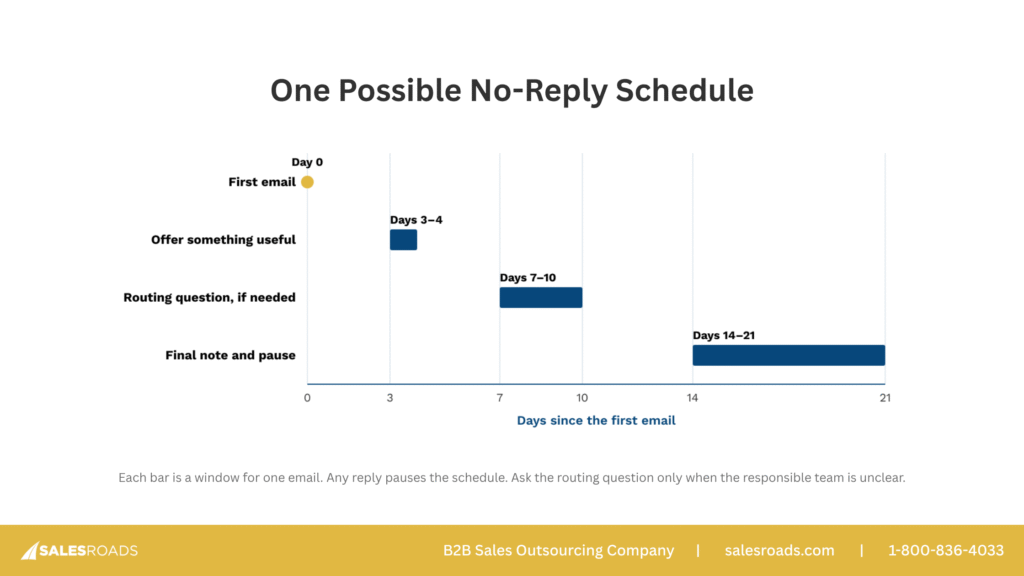
Coordinate email and calls in your sales follow-up plan so another rep doesn’t repeat an answered question. When you’ve run out of relevant additions, pause the sequence. Revisit the account when there’s a fresh reason, checking its contact history first. A clear no or an opt-out remains a stop.
Check the Country, Recipient, and Inbox Rules Before You Send
For a U.S. outbound campaign, the CAN-SPAM Act requires accurate sender details, truthful subject lines, clear advertising identification, a valid postal address, and an easy opt-out option. Honor opt-outs within 10 business days and keep that mechanism working for at least 30 days after sending. Both the sending agency and the business being promoted can be held responsible for violations.
Have whoever manages your email outreach software check Gmail’s and Yahoo’s sender requirements, especially authentication and unsubscribe handling. Test the unsubscribe process yourself, including how quickly a request stops scheduled follow-ups. Bulk senders face additional obligations, such as Yahoo requiring them to honor unsubscribes within two days.
More territories expands your broadcasting reach but also means more rules to check. A U.S. team adding UK prospects needs to review the UK’s Privacy and Electronic Communications Regulations (PECR). Corporate subscribers can receive marketing email without prior consent, but the sender must identify themselves and provide a valid opt-out address. Sole traders and some partnerships need consent or a qualifying soft opt-in. For that exception, you must have collected the details during a sale or sales negotiation for your own similar products or services, as well as offered an opt-out at collection and in every message after.
Using a work address that identifies a person counts as processing personal data, so data protection rules also come into play. Check whether your organization’s activities fall within the UK General Data Protection Regulation (GDPR). If they do, establish a lawful basis for using that contact’s data, explain how you’ll use it, and honor objections to direct marketing.
Keep opt-outs in a “do not contact” record shared across your CRM, email platform, and any agency handling outreach. Be sure to check new contacts against that record before sending any messages. Simply deleting an address risks adding it again the next time someone imports a list.
How to Measure B2B Sales Email Performance
If you receive 20 replies out of 1,000 emails sent, that gives you a 2% reply rate. Divide the same 20 replies by 400 recorded opens though, and you get 5%. You haven’t received another reply. You’ve just changed what you’re measuring.
Check how your platform calculates reply rate before comparing it to a published average. Hunter’s 3% average for sales outreach on its platform, for example, measures the share of recipients who replied at any point in the sequence. A tool that divides replies by the number of emails sent can show a different percentage for the same campaign.
Recorded opens are easy to misread. Email tools often register an open when just a small image loads. Case in point, Apple’s Mail Privacy Protection downloads remote content in the background even when the recipient hasn’t engaged with the email. As a result, your dashboard may show an open while the proposal remains unread. Follow up on an actual response or agreed next step instead of relying on that uncertainty.
To follow a campaign’s prospects, use the first three rates below for the same group over the same review period. Count each person once for every outcome and leave out automated replies. A reached prospect has had at least one message accepted by the receiving mail system. Track sending failures, opt-outs, and complaints separately.
| Rate | Calculation × 100 | Reference points and targets |
| Reply | Prospects who replied ÷ prospects reached | 4% (40 replies per 1,000 prospects) |
| Positive reply | Prospects who expressed interest ÷ prospects reached | 2% (20 interested prospects per 1,000) |
| Booked meeting | Prospects who booked a meeting ÷ prospects reached | 1% (10 bookings per 1,000 prospects) |
| Bounce | Bounced messages ÷ attempted sends | Amazon SES hard-bounce guidance: below 2% in its own calculation |
| Unsubscribe | Unique unsubscribe requests ÷ delivered messages | Compare with similar campaigns. An illustrative rise from 0.2% to 1% is fivefold |
| Complaint | Reported spam complaints ÷ the provider’s specified message count | Gmail Postmaster guidance: below 0.10%. Avoid 0.30% or higher |
Imagine a pilot program needs 10 booked meetings from 1,000 reached prospects to justify continuing. That’s a 1% meeting target. For this fictional example, assume half the interested prospects book and half the replies show interest. Working backward, you’d need 20 interested prospects and 40 replies, giving you targets of 2% and 4%. After the pilot, replace those assumptions with your observed conversion rates.
Agree on what counts as interest before you start. A wrong-person redirect helps you find the contact, but interest in the offer still needs to come from that buyer. Separately track meetings booked, meetings held, and meetings with buyers who meet your qualification criteria. A full calendar is less useful when few people attend or the buyers are a poor fit.
Use Amazon SES’s 2% hard-bounce rate for reference. Note that SES excludes temporary failures from that figure, so keep tracking those separately. You should also read Gmail’s complaint rate in Postmaster Tools and check your provider’s rules on unsolicited email.
A Worked Test of Two Closing Questions
A/B testing is also a great way to gauge the success of your email sequences and identify which elements work and which don’t. Suppose you want to test a direct meeting request against a question about interest. Keep the subject, offer, and the rest of the email identical. These two versions change the final question only.
| Version A · Meeting request | Version B · Interest question |
|---|---|
| From: Maya To: Sam Subject: A prospecting idea for Harborline Hi Sam, I noticed Harborline sells across several regions. SalesRoads researches accounts, verifies contacts, and runs phone-led outreach for software teams. We could test prospecting in one region before you decide on wider coverage. Would you have 15 minutes next week to discuss a regional test? Best, Maya | From: Maya To: Sam Subject: A prospecting idea for Harborline Hi Sam, I noticed Harborline sells across several regions. SalesRoads researches accounts, verifies contacts, and runs phone-led outreach for software teams. We could test prospecting in one region before you decide on wider coverage. Would a regional prospecting test be relevant to your team? Best, Maya |
Randomly split comparable prospects between Version A and Version B. Use the same sender and mail-out timing and handle follow-ups the same way. Before sending, decide how to classify replies, which contacts to exclude, and when to compare results. After three weeks, compare positive-reply rates and the number of meetings each version booked.
| After three weeks | Example target | Version A | Version B |
| Prospects reached | 1,000 | 1,000 | 1,000 |
| Prospects who replied | 40 (4.0%) | 40 (4.0%) | 45 (4.5%) |
| Prospects who expressed interest | 20 (2.0%) | 10 (1.0%) | 18 (1.8%) |
| Prospects who booked a meeting | 10 (1.0%) | 4 (0.4%) | 8 (0.8%) |
Both versions met the reply target. While B brought more interested prospects and eight bookings against A’s four, it still missed the pilot’s positive-reply and meeting targets. Read the replies to understand what interested those buyers, then test B with another comparable group. Keep the results with the exact email copy so your team can build on the test.
Use delivery records, replies, and meeting outcomes to decide what to change next:
- If messages bounce, check addresses and sending errors before editing the copy.
- If delivery is steady but replies are scarce, check that you’re emailing the person responsible for the work. Does the opening explain why your offer is relevant to them? Can they answer the closing question without looking up information first?
- Replies without interest call for a closer look at the offer and its proof.
- When interested buyers don’t book, check response speed and the scheduling exchange.
- When meetings produce few opportunities, review qualification criteria and what buyers expected to discuss. Their replies and meeting notes will help you choose the next element to change.
Check complaints and opt-outs alongside replies. If they increase, review who you’re contacting and how often. For Gmail, compare the spam rate in Postmaster Tools with Google’s limits. Your outreach software may calculate complaints differently.
How SalesRoads Turns Email Templates Into an Outbound System
Good copy needs someone to research the account, answer the reply, and carry the conversation forward. At SalesRoads, our outbound email services connect that work with tailored messages and campaign review.
Our adaptive outbound methodology organizes the campaign into four phases:
- Discover: Understand your business, goals, market, and challenges.
- Strategize: Develop the campaign approach around that understanding.
- Test: Launch the approach and review SDR feedback alongside campaign results.
- Accelerate: Refine and expand the approach as the outreach reveals what works.
In day-to-day outreach, the team handles the same activities:
- Identify: Find the decision-makers for the target accounts.
- Verify: Check the contacts through research and validation, including LinkedIn.
- Contact: Coordinate phone and email outreach to the right people.
- Reengage: Revisit appropriate prospects after a rest period, respecting their contact history and preferences.
Our appointment-setting teams combine experienced SDRs with dedicated coaching. Call and email review gives coaches concrete exchanges to discuss with reps, whether it’s an unclear opening or an objection that needs a better answer.
When an email raises a question, the next call gives the rep a chance to explore it. When a call uncovers an objection, the follow-up can answer it directly. The next message starts with something the prospect has actually said.
Make the Next Email Easier to Get Right
Take the next email your team is about to send and read it out loud. Would the recipient know why you wrote to them? Is the offer clear enough to answer? Keep the company detail that makes the connection and cut the explanation they don’t need yet.
Then follow the conversation you actually get. An interested buyer needs a thoughtful reply. With a referral, continue the introduction thread or explain who suggested you get in touch. A request to stop needs to be honored. Even an unanswered sequence deserves an ending your team will respect.
If your reps have workable emails but little time to research accounts or keep up with replies, request a quote from SalesRoads. We’ll discuss the targeting, phone and email outreach, and follow-up your campaign needs, along with the work your own team will keep.
FAQs
How many sales email templates does a B2B team need?
Keep a template for each recurring outreach situation that needs a different opening or request. First contact, referrals, routing, and follow-ups are useful starting points. Give referrals separate versions for a real introduction and permission to mention a name. Add another template when the conversation changes, such as a requested proposal. Industry names and company details usually belong in adaptation.
Can the same sales email template work across industries?
Often, yes. A routing email still asks who handles the work, whether the prospect sells software or industrial equipment, etc. Change the proof, vocabulary, and buying roles to match the recipient and check any industry-specific sending requirements. Create a separate version when those differences change the explanation or request. Otherwise, keep one adaptable email and tailor the details carefully.
When should you retire a sales email template?
Retire a template when its offer is outdated, its claims can’t be supported, or a better version has replaced it. Repeated poor results and recurring misunderstandings in replies are reasons to investigate. Check targeting and delivery before blaming the wording. Save what the team learned with the replacement, then remove the old copy from the active library so reps don’t keep using it.